
Secure and trusted remote invigilation at scale.
Continuous video and audio capture, identity verification, browser controls and AI-assisted adjudication for organisations that need confidence in the integrity of remote assessments.
Online Invigilator helps institutions monitor, review and manage remote examinations through a combination of automated detection, secure evidence capture and human-led decision-making.
Imagine invigilating an online exam without relying on continuous internet connectivity.
Remote examinations give students flexibility, but they create a major challenge for institutions: how do you maintain visibility and academic integrity when students are writing outside a controlled examination venue?
A student may lose connectivity during an exam. They may use another device, leave the examination environment, access unauthorised resources or have another person enter the room. When this happens, institutions need reliable evidence to understand what actually happened.
Traditional online proctoring can also leave institutions with hours of video and audio recordings to review manually. With hundreds or thousands of students, finding the few moments that matter can become a significant administrative burden.
So we built Online Invigilator.
Online Invigilator is an advanced online invigilation app designed to keep monitoring students even when internet connectivity is interrupted.
The app can securely capture relevant examination activity locally and synchronise the evidence when connectivity becomes available, helping institutions maintain continuity throughout the assessment.
It combines video and audio recording, screen recording, browser lockdown, identity verification, GPS/location detection, no copy-and-paste controls, transcriptions, language detection and AI-assisted analysis to provide a comprehensive view of the examination environment.
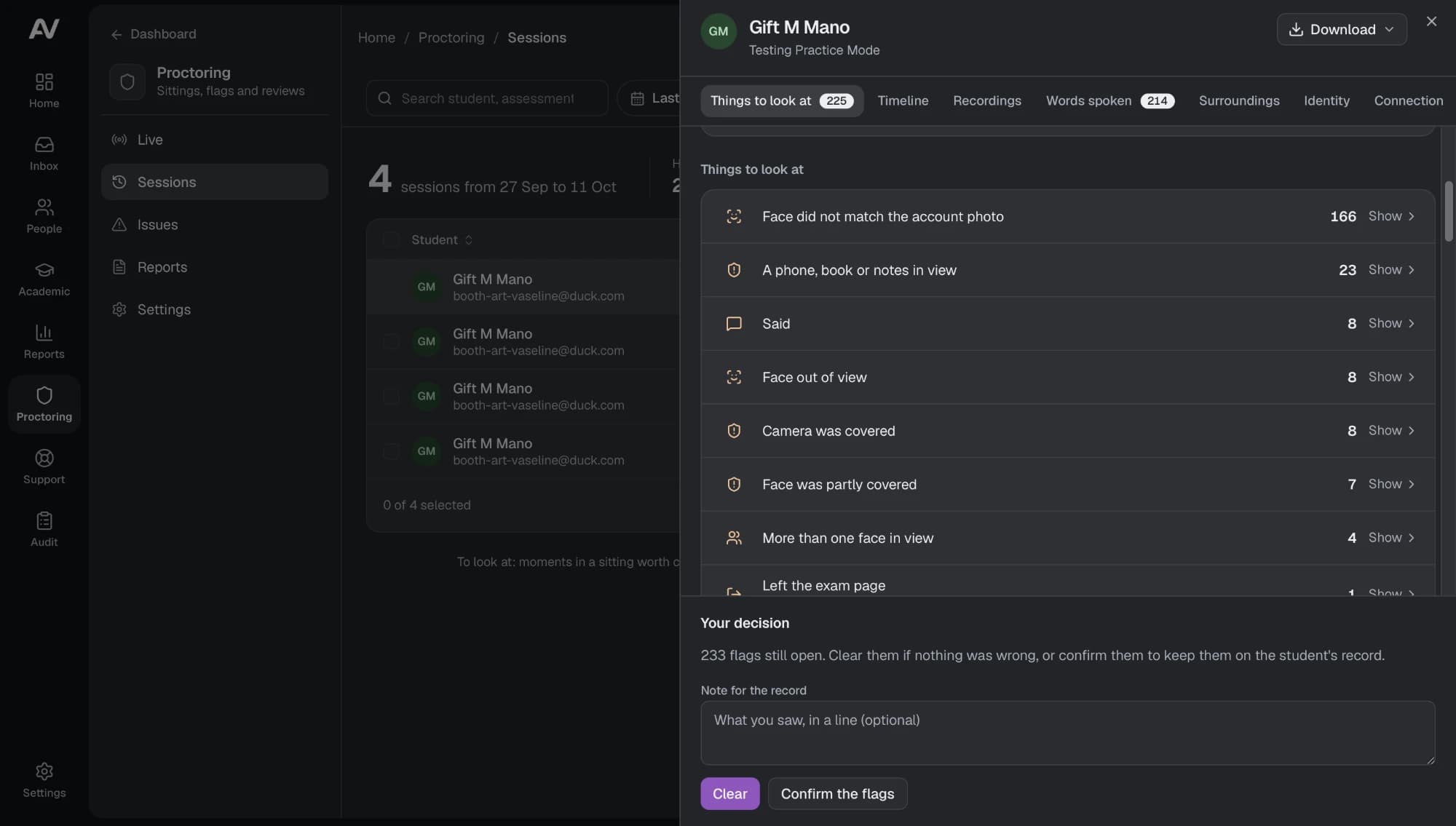
Instead of simply recording everything and leaving an invigilator to search through hours of footage, Online Invigilator can analyse examination activity and surface events that may require attention, allowing authorised reviewers to focus on the evidence that matters.
Monitor. Capture. Analyse. Decide.
Online Invigilator helps institutions move from simply watching online examinations to having structured, actionable evidence for academic integrity decisions.
Everything Online Invigilator does — and why it matters.
Identity verification
Confirm the candidate's identity before the exam begins with ID capture, selfie comparison and configurable pre-exam checklists.
Manual review available
Continuous video and audio recording
Capture configurable video and audio evidence throughout the examination session.
Configurable retention
AI-assisted behaviour analysis
Surface potential events — head position, eye gaze, absence, unexpected sound — for human review instead of manual monitoring.
Flags require human review
Detect multiple devices
Identify the possible presence of additional phones or devices within the examination environment.
Flagged for review
Browser lockdown and assessment controls
Restrict navigation, control applications and windows, and disable copy-paste to keep candidates inside the approved environment.
Works alongside Learn
Screen recording and activity monitoring
Record or monitor screen activity, application focus and window events on the candidate's device, where enabled.
Configurable per institution
Speech transcription and analysis
Turn recorded audio into searchable, timestamped transcripts so reviewers can investigate faster.
Searchable transcripts
Language detection
Analyse the audio environment to help reviewers understand language activity during the assessment.
Included in evidence review
Location and GPS detection
Capture available location information from supported devices for assessments with location requirements.
Policy-configurable
Instead of watching a 3-hour exam from beginning to end…
Online Invigilator helps you go directly to the moments that need review.
Reviewing examination recordings manually can take hours — especially when hundreds or thousands of students are writing at the same time.
Online Invigilator uses AI-assisted analysis to identify unusual events and surface moments that may require attention, so authorised reviewers can focus on the evidence that matters instead of watching every minute of every recording.
Find what matters
- See AI-identified events that may require attention
- Jump directly to relevant moments instead of reviewing entire recordings
- Review supporting video and audio evidence
- Review screen activity, where enabled
Investigate deeper
- Search time-stamped transcripts
- View event timelines and activity records
- Add notes and supporting observations
Resolve and record
- Categorise and prioritise incidents
- Escalate cases for additional review
- Record final adjudication decisions
- Maintain a complete evidence history and audit trail
Watch how remote invigilation works.
See the complete invigilation journey — from candidate identity verification and pre-exam checks to continuous monitoring, AI-assisted flagging and human review.

Built for high-stakes remote assessment.
Fully remote university examinations
Support remote examinations while giving authorised teams greater visibility into the assessment environment and potential integrity events.
Professional and certification examinations
Create structured monitoring and evidence workflows for assessments where results must be reviewed and defended.
Remote hiring and skills assessments
Monitor candidate identity and assessment activity during remote recruitment, technical and skills evaluation processes.
Secure the assessment experience.
See how Online Invigilator can support your organisation’s remote examination and assessment workflows.